STEP 01
Access Profile Settings
Sign in to your account at Google Cloud Skills Boost. Click your profile avatar in the top-right corner and select Settings.
Making your profile public allows the official Google Cloud Arcade team to verify your lab activity and maintain your swag eligibility. It also enables ArcadeCalc to parse your public badges in real-time, compute total Arcade points, and predict milestone rewards.
Sign in to your account at Google Cloud Skills Boost. Click your profile avatar in the top-right corner and select Settings.
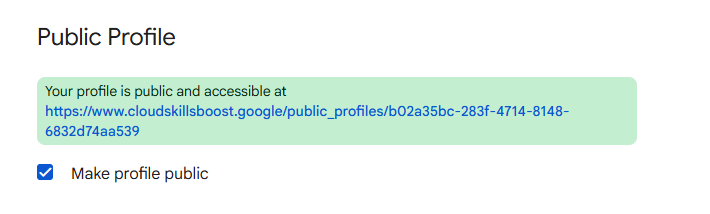
Scroll down to the Public visibility section. Check the box labeled "Make profile public" and click "Update settings" button to save changes.
Once saved, your unique public profile link will be displayed under your setting details. Copy the complete URL string to track your progress on ArcadeCalc.
Once your settings are saved, your profile page will look like the annotated reference screenshot below. Copy your complete public profile URL and paste it into ArcadeCalc to calculate your points and track completed badges:
Enter your Google Skills Boost profile URL on ArcadeCalc to automatically track completed badges and check your swag prize tier eligibility.